1. How to share a folder?
2. How to allow browsing access to your folder to other users?
3. How to provide the users with moderator access to your folder?
4. How to add a folder to 4shared search?
5. How to let other users download your shared folder in 1 click?
2. How to allow browsing access to your folder to other users?
3. How to provide the users with moderator access to your folder?
4. How to add a folder to 4shared search?
5. How to let other users download your shared folder in 1 click?
How to share a folder?
- Right-click on the folder you wish to share;
- Select “Sharing & Security” option from the appearing menu;
- Open the “General” tab;
- Choose “Share this folder” and click “Save” to save the changes.
How to allow browsing access to your folder to other users?
- Right-click on the folder you wish to share;
- Select “Sharing & Security” option from the appearing menu;
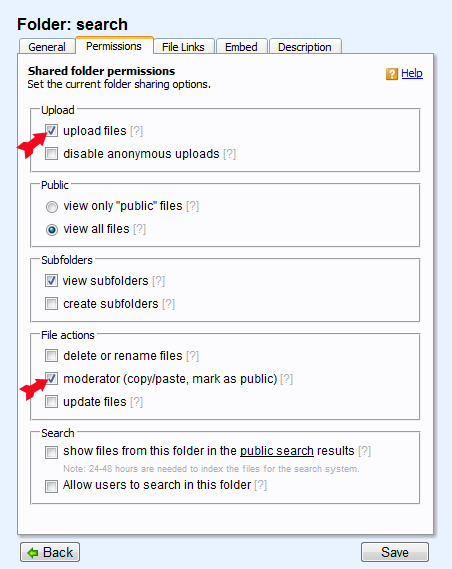
- Open the “Permissions” tab;
- Choose either “view only “public“ files”, or “view all files” and click “Save” to save the changes.
How to provide the users with moderator access to your folder?
- Right-click on the folder you wish to share;
- Select “Sharing & Security” option from the appearing menu;
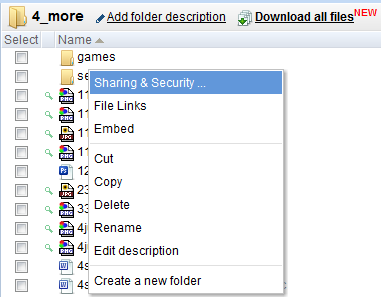
- Open the “Permissions” tab;
- Mark any/all of the following options: “upload files”, “Web Grab”, “delete or rename files”,
“moderator (copy/paste, mark as public), “view subfolders” “create subfolders” to define the level
of access, you wish to provide other users with, and click “Save” to save the changes.
How to add a folder to 4shared search?
- Right-click on the folder you wish to share;
- Select “Sharing & Security” option from the appearing menu;
- Open the “Permissions” tab;
- Select “Allow users to search in this folder” and click “Save” to save the changes.
How to let other users download your shared folder in 1 click?
- Right-click on the folder you wish to share;
- Select “Sharing & Security” option from the appearing menu;
- Open the “Permissions” tab;
- "원클릭 다운로드"를 선택하고 변경 사항을 저장하려면 "저장"을 클릭합니다.
체험담:

Jason, 23
“ My friends and me play in the band, so I’ve created 1 folder to give file sharing access to the music pieces, we like to discuss, if everyone likes it, and if we can some guitar, or drum techniques from a certain track, for example. It’s also good to download our new demos, as soon Mike (our frontman) gets them from the sound-studio.”
“ My friends and me play in the band, so I’ve created 1 folder to give file sharing access to the music pieces, we like to discuss, if everyone likes it, and if we can some guitar, or drum techniques from a certain track, for example. It’s also good to download our new demos, as soon Mike (our frontman) gets them from the sound-studio.”

Joshua, 35
“ I’m a volunteer in one of the NGOs in my home town, San Diego, and the created shared folder in my account at 4shared includes all possible information about environmental protection, eco-life and social services, provided by our organization. The folder is also open for everyone to add their stories, interesting articles on the relative topics, etc. 4shared is really helping us spreading the eco-ideas all over the world.”
“ I’m a volunteer in one of the NGOs in my home town, San Diego, and the created shared folder in my account at 4shared includes all possible information about environmental protection, eco-life and social services, provided by our organization. The folder is also open for everyone to add their stories, interesting articles on the relative topics, etc. 4shared is really helping us spreading the eco-ideas all over the world.”